> ## Documentation Index
> Fetch the complete documentation index at: https://docs.medstrato.com/llms.txt
> Use this file to discover all available pages before exploring further.
# Public KOL Profile Page
> Share a public-facing KOL profile with link, QR code, and CV download, and optionally let the expert claim the profile.
 ## What this page is
Each KOL can have a public-facing profile page you can share with internal or external stakeholders. It consolidates key bio, credentials, and academic indicators into a single URL.
## What’s included
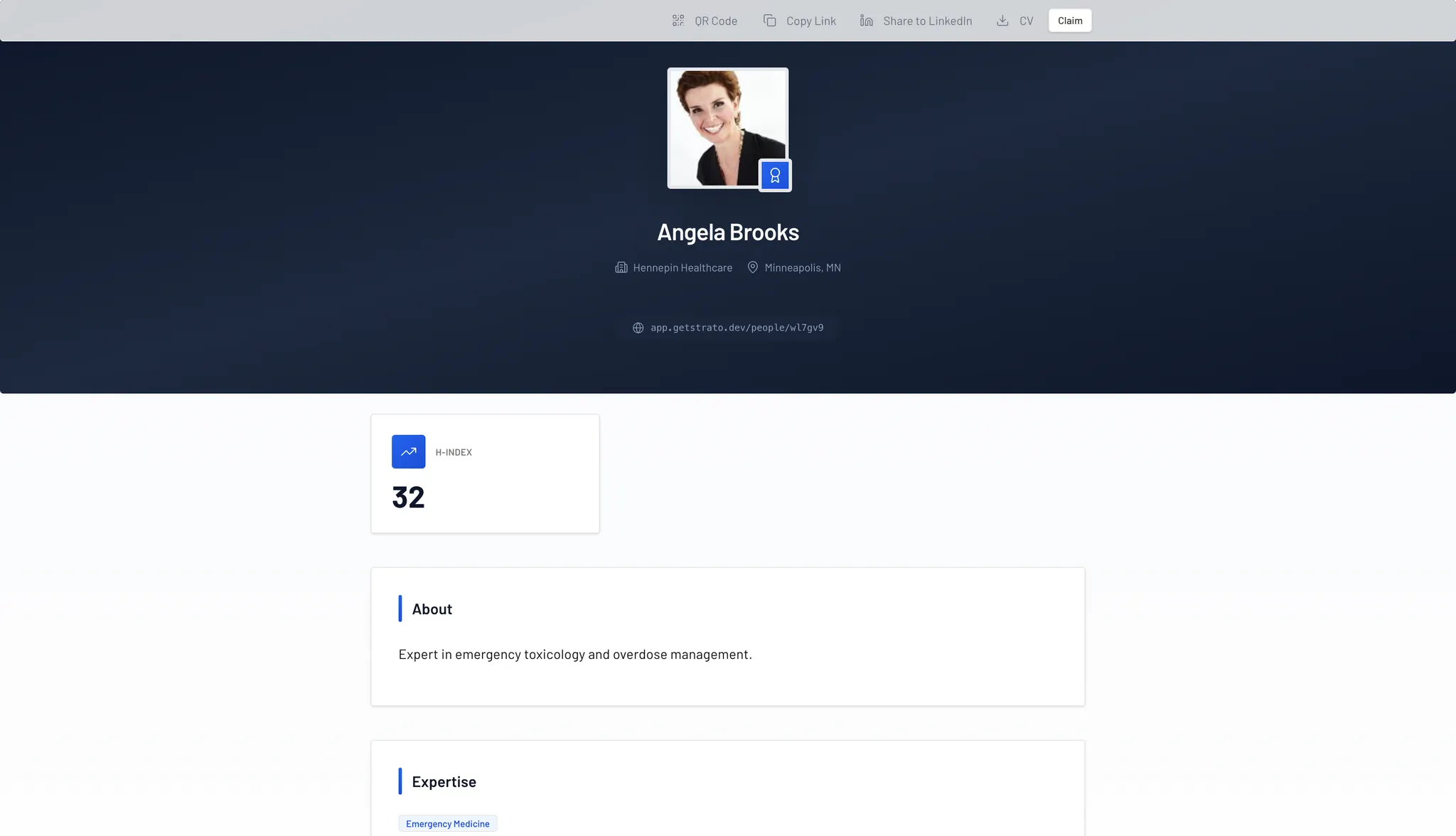
* **Academic Credibility Metrics**: The profile prominently displays the expert’s **H-Index**, providing an immediate, data-driven assessment of their scientific impact and publication authority.
* **Professional Identity**: Includes the expert’s high-resolution headshot, full name, primary institution (e.g., Hennepin Healthcare), and geographical location.
* **Narrative Bio and Expertise**:
* **About**: A concise professional summary detailing the expert's clinical focus and career objectives.
* **Expertise Tags**: Standardized clinical tags (e.g., "Emergency Medicine") that allow for immediate identification of the expert's primary medical domain.
## Sharing and utility tools
The top utility bar provides several mechanisms for sharing and utilizing the profile data:
* **QR Code**: Generates a scannable code for instant mobile access to the profile, ideal for use during in-person conferences or presentations.
* **Copy Link**: Provides a unique, permanent URL (e.g., app.medstrato.com/people/\[unique\_id]) for digital distribution via email or internal reports.
* **Social Integration**: Supports direct sharing to **LinkedIn**, allowing the organization or the expert to highlight their professional standing within their broader network.
* **CV Download**: Enables one-click access to the expert's full Curriculum Vitae in a standardized format.
## Claiming a profile
A critical component of this portal is the **Claim** functionality. This allows the KOL to personally verify their profile, ensuring data accuracy and fostering a direct collaborative link between the expert and the organization. Once a profile is claimed, the expert can manage their own details, further increasing the value of the platform as a professional networking tool.
## Tip
Use public profiles when you need a consistent, shareable summary for introductions, conference prep, or internal briefs.
Public KOL profiles are the app URLs intended for search indexing and sharing. Keep private dashboard, settings, and login URLs out of external documents and public pages.
## Related resources
See how public profiles fit into the broader KOL workflow.
Add the source profile before publishing a public page.
## What this page is
Each KOL can have a public-facing profile page you can share with internal or external stakeholders. It consolidates key bio, credentials, and academic indicators into a single URL.
## What’s included
* **Academic Credibility Metrics**: The profile prominently displays the expert’s **H-Index**, providing an immediate, data-driven assessment of their scientific impact and publication authority.
* **Professional Identity**: Includes the expert’s high-resolution headshot, full name, primary institution (e.g., Hennepin Healthcare), and geographical location.
* **Narrative Bio and Expertise**:
* **About**: A concise professional summary detailing the expert's clinical focus and career objectives.
* **Expertise Tags**: Standardized clinical tags (e.g., "Emergency Medicine") that allow for immediate identification of the expert's primary medical domain.
## Sharing and utility tools
The top utility bar provides several mechanisms for sharing and utilizing the profile data:
* **QR Code**: Generates a scannable code for instant mobile access to the profile, ideal for use during in-person conferences or presentations.
* **Copy Link**: Provides a unique, permanent URL (e.g., app.medstrato.com/people/\[unique\_id]) for digital distribution via email or internal reports.
* **Social Integration**: Supports direct sharing to **LinkedIn**, allowing the organization or the expert to highlight their professional standing within their broader network.
* **CV Download**: Enables one-click access to the expert's full Curriculum Vitae in a standardized format.
## Claiming a profile
A critical component of this portal is the **Claim** functionality. This allows the KOL to personally verify their profile, ensuring data accuracy and fostering a direct collaborative link between the expert and the organization. Once a profile is claimed, the expert can manage their own details, further increasing the value of the platform as a professional networking tool.
## Tip
Use public profiles when you need a consistent, shareable summary for introductions, conference prep, or internal briefs.
Public KOL profiles are the app URLs intended for search indexing and sharing. Keep private dashboard, settings, and login URLs out of external documents and public pages.
## Related resources
See how public profiles fit into the broader KOL workflow.
Add the source profile before publishing a public page.